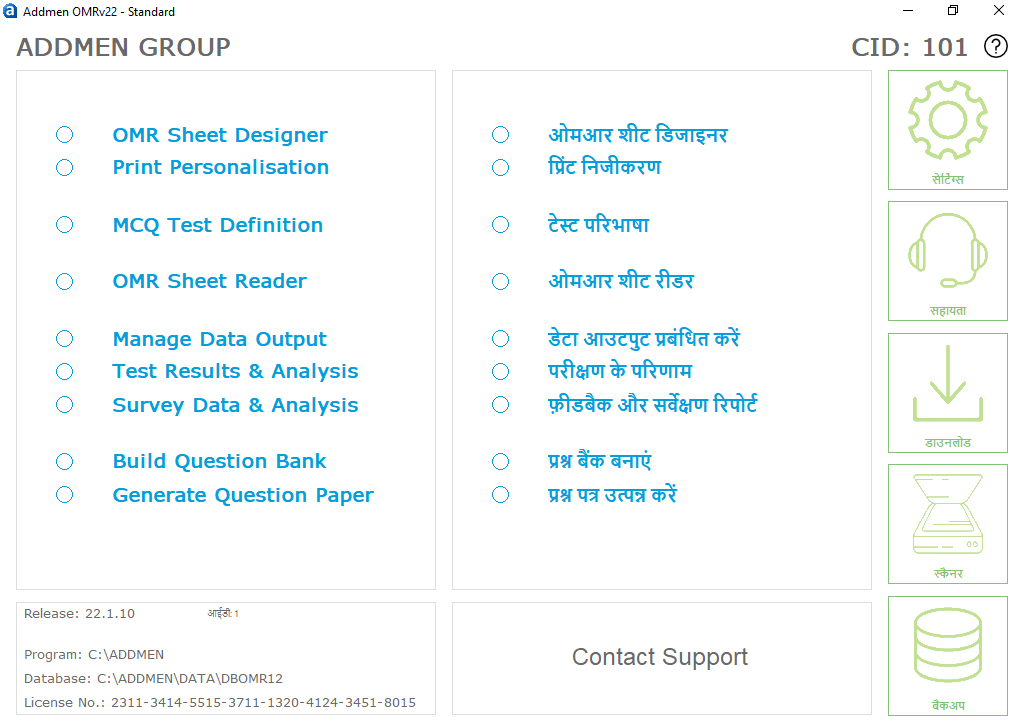
Addmen OMR Software is a comprehensive Optical Mark Reader solution offered as a lifetime licensed software with one‑time payment. There is no annual licensing fee, and the software imposes:
No limitation on sheet design
No restriction on number of tests
No limit on number of OMR sheets
It includes two primary modules:
Addmen’s Optical Mark Reader software:
Automates data processing of Multiple Choice Questionnaire (MCQ) forms
Reads candidate responses on OMR sheets or forms
Converts marked responses into electronic data
Enables statistical analysis and reporting exported into Excel or other formats
This solution is widely used by educational institutions and assessment bodies to speed up evaluation of objective exams and feedback forms with detailed insights.
The OMR Answer Sheet Check Software is designed to:
Efficiently read completed OMR answer sheets
Provide detailed performance reports
Enable subject-wise and question-wise analysis
Save time by quickly processing large volumes of answer sheets
The reporting functionality is often cited as one of the most powerful features, offering deep understanding of student performance.
The OMR Form Reader module:
Collects data from structured forms such as admission forms, surveys, and questionnaires
Reads OMR fields, OCR printed IDs, and captures images such as candidate photos and signatures
Converts the collected data into digital formats for use in analytics and storage
Addmen’s OMR software delivers 100% accurate results even when sheets are:
Tilted
Skewed
Rotated or misaligned
Unlike some hardware OMR scanners that require perfectly straight scanning, Addmen OMR software:
Automatically rotates and corrects tilted sheets
Is unaffected by paper thickness or OMR sheet color
Maintains accuracy regardless of the number of sheets processed
The intelligent scanning detection mechanism minimizes rejection rates by automatically adjusting reader parameters for different scan modes within the same batch.
The OMR Sheet Reader runs efficiently on Windows platforms including:
You do not need an internet connection to scan sheets using the OMR software.
The Addmen OMR software is optimized for performance:
Processes 500+ OMR sheets in about 10 minutes
OMR form reading speed is consistent regardless of the number of OMR sheets
This high reading speed is achieved without compromising accuracy or performance during result calculation and reporting.
The workflow for using the software includes:
Set parameters such as:
OMR Test Name
Test Date
Subjects
Number of MCQs per section
Enter answer keys manually
Or paste them from Excel
Set marking schemes and topic tags
Calculate results
View marklists, statistics, and detailed analysis
Export to Access, Excel, dBase, or XML
The software supports advanced test configuration:
Create unlimited OMR tests
Evaluate multiple sets of test papers automatically
Apply complex marking schemes such as decimal, bonus, and negative marking
Support for multiple input methods (manual entry, calibrating from sheet)
Software prompts for common errors like blank ID, invalid ID, duplicate marks, or wrong test set
Ability to re-evaluate data after scanning without re-scanning sheets
Manual marks entry for non-OMR portions
The Addmen OMR Software provides comprehensive result outputs:
Selectable display parameters such as Percentage, Percentile, Test Rank, Class Rank
Sorted reports by Name, Student ID, or Rank
Graphical progress analysis with bar, pie, and line charts
Comparison across subjects, sections, and performance levels
Detailed OMR sheet analysis with question-level insights
Test group analysis and statistical summaries
Individual candidate analysis
Multi-column reports for multi-subject tests
Reports in print-ready formats
Reports can be exported into PDF, Excel, Word, RTF, etc.; results can also be sent via SMS or email, or displayed on a website.
The software is built for ease of use and efficient workflow:
Lean, focused workflow without unnecessary features
Quick processes:
4-step Answer Sheet Checker
2-step Form Reader & Application Data Collector
Scan at any DPI — color, grayscale, or B/W
Intelligent defect detection adapts to different scanning modes
Colour-dropping mechanism for coloured sheets
Alerts for duplicate or incorrect entries
Context-specific settings and inline help
Independent report creation using Excel export
Built-in facility to send results via SMS
Addmen offers strong support and training:
Complete user guides with screenshots
Training videos covering all modules
Dedicated technical support teams
Backup support for each module
One-to-one online training (15-20 mins) for first-time users — repeatable as needed
Runs on most Windows versions (XP, Vista, 7, 8, 10)
Works with any standard laser or inkjet printer
Compatible with any scanner brand or model
No need to install the scanner software on the same PC as the OMR software
Export data to PDF, Excel, Access, CSV, XML, DBF, and more
One-click installation process
Frequent updates available via the Addmen support portal
Addmen OMR Software is available in three versions:
Standard Version – Optimal for typical use
Professional Version – Handles large volumes and special sheets (e.g., missing index points)
Server Version – Ideal for distributed setups with real-time data integration and centralized data capture, with license‑free clients for terminals