- OMR+ICR Software for CBSE 2021
- +91 9229113533
- +91 9229113566
- info@addmengroup.com
- Send Query
- Available as OEM on GeM

Test Maker is not limited to MCQ tests or multiple choice question and answers. It can handle all type of questions :
| With Options | Without Options |
|---|---|
| Multiple Choice | Theory |
| Fill in the blank | Numericals |
| True or False | Diagram making |
| Column Matching | Common Passage |
Yes, we can include Question and options text with diagrams, formulas, equations and pictures.
Yes, we can include Questions and answers of any language.
We can also make bilingual test papers, and also test papers of different languages, separately.
We enter the questions and answers in the word files. We call them Question Resource files or QR files.
We create our filters and property tags in the Question bank software, and allocate these tags references to the questions in the QR files.
Question text is stored in word files but its properties and classification information is stored in Question Bank Software database.
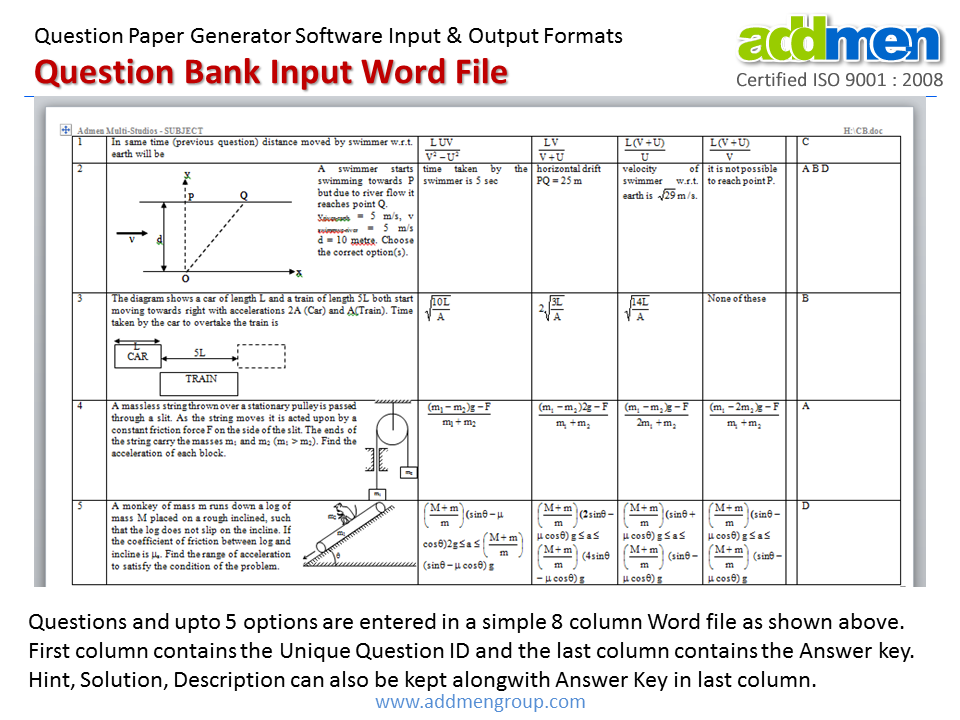
We can create any number of Question Bank files in our computer. These files can be indexed by the question bank software.
Any number of questions can be stored in a Question Resource (QR) word file, provided the file does not become too heavy for the convenient working of the operator. Though you can maintain subject-wise files, but it is always convenient to maintain topic-wise files. Subject-wise files may become too heavy to open and edit, so it is better to keep them small with around 200 questions.
We can give any desired name to the Question Resource (QR) word files so that it is convenient for us to understand. The software question bank does not have any specific requirement for file name.
Yes, we can include non-MCQ type of questions also. Yes, we can include questions based on passage comprehension.
Yes, we can directly access the desired question from a large bank of thousands of questions by directly clicking the edit button on the software interface. The word file containing that question opens with the cursor on the selected question which can be edited and saved.
No, there is no compulsion to open and edit files in the Question Bank software only. These Question Resource (QR) word files can be directly accessed and edited by the operator in Word.
There are several filters and property tags in the software like : Subject / Unit, Chapter, Topic, Category / Class, Difficulty Level / Marks Level, Reference etc. These properties can be allocated to a question.
The question content lies in a referenced DOC file called the QR file (Question Reference File) while the properties of the questions are stored in inbuilt database of Question bank software.
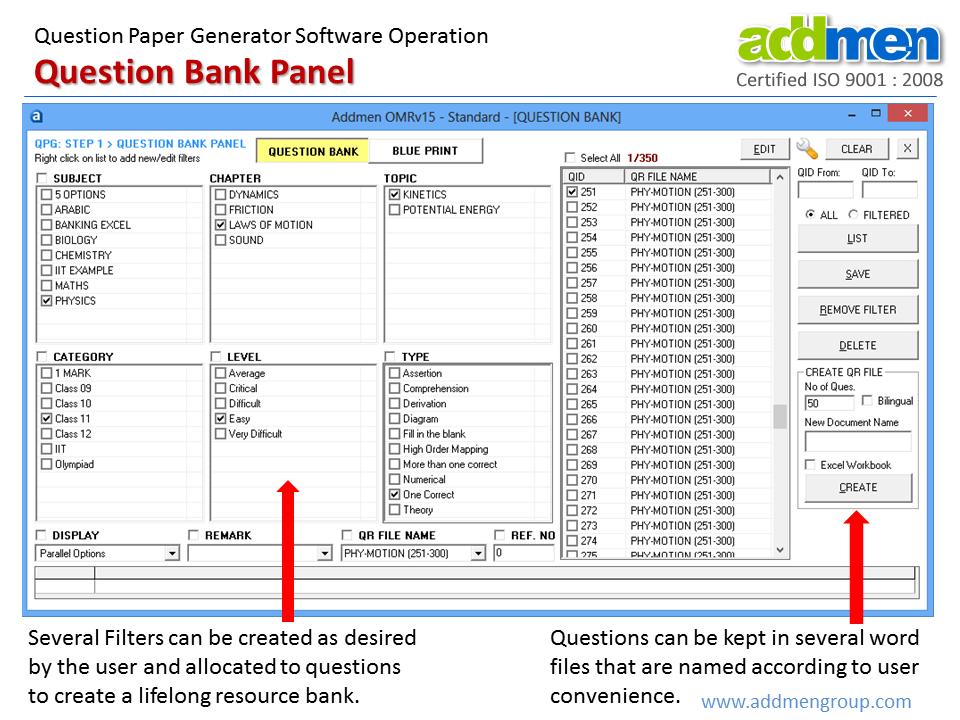
Yes we can have user defined filters. We can change the title of the already existing filters and add our own filters for classification of questions.
We can create nested (interdependent) filters like- Unit-Chapter-Topic. We can also create simple filters like- Category, Difficulty Level, Marking Scheme, Question Type etc..
It finds questions by random selection from software Question Bank based on the properties or filters specified in the blueprint.
During random selection the software gives priority to the least-used questions. It prefers not to repeat previously used questions unless there is shortage of fresh questions. We can also selectively include or exclude questions from any particular blueprint.
We can also selectively exclude questions of any particular blueprint.
Test paper blue print can be defined in the blue print panel. When we select the desired properties, the question generator software shows us the count of available questions matching that property. Then we enter the desired numbers of question based on that property in the question paper.
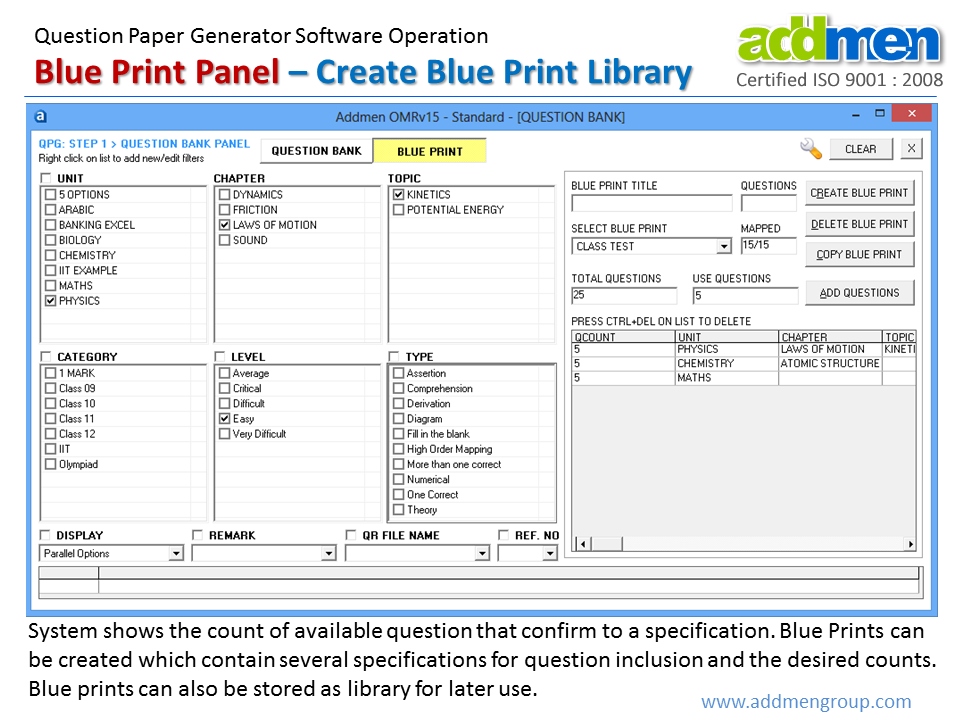
Any number of Question paper blue prints can be made and stored in the question bank software library for later use.
Any number of question papers can be made for a given blueprint. Each question paper will contain unique questions unless there is shortage of questions.
For every question paper about multiple different sets can be made by question shuffler software. Question shuffling takes place within a section so questions of two different subjects or sections do not get mixed.
Answer key also gets shuffled simultaneously along with question shuffling.
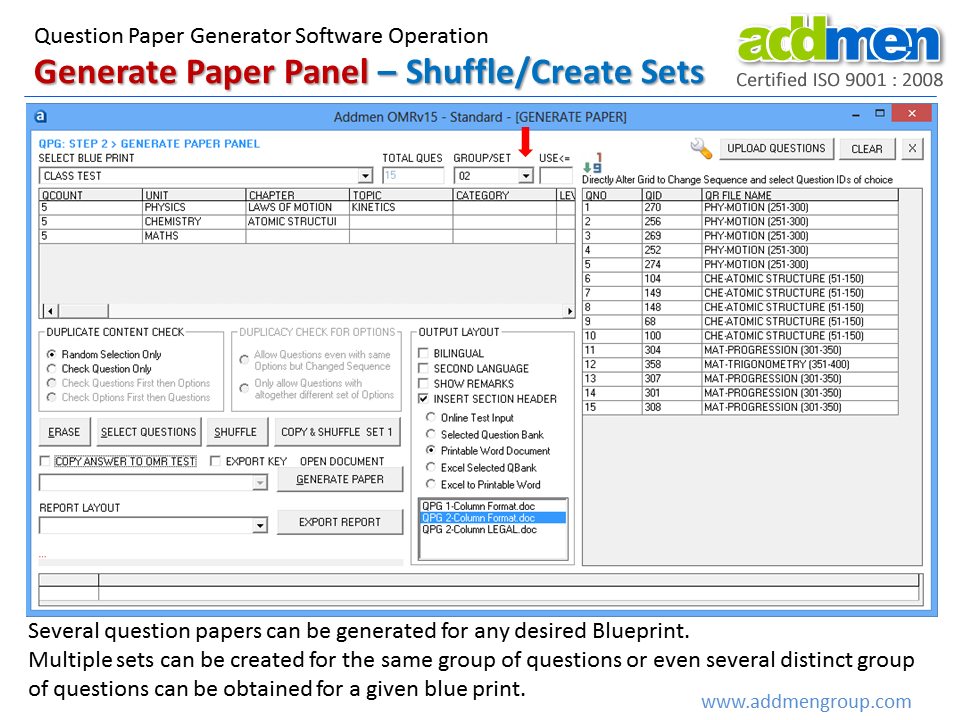
QPG creates printable output for pen & paper based tests and it also generates tabular soft copy output which can be used as an online question bank input to Online Test System.
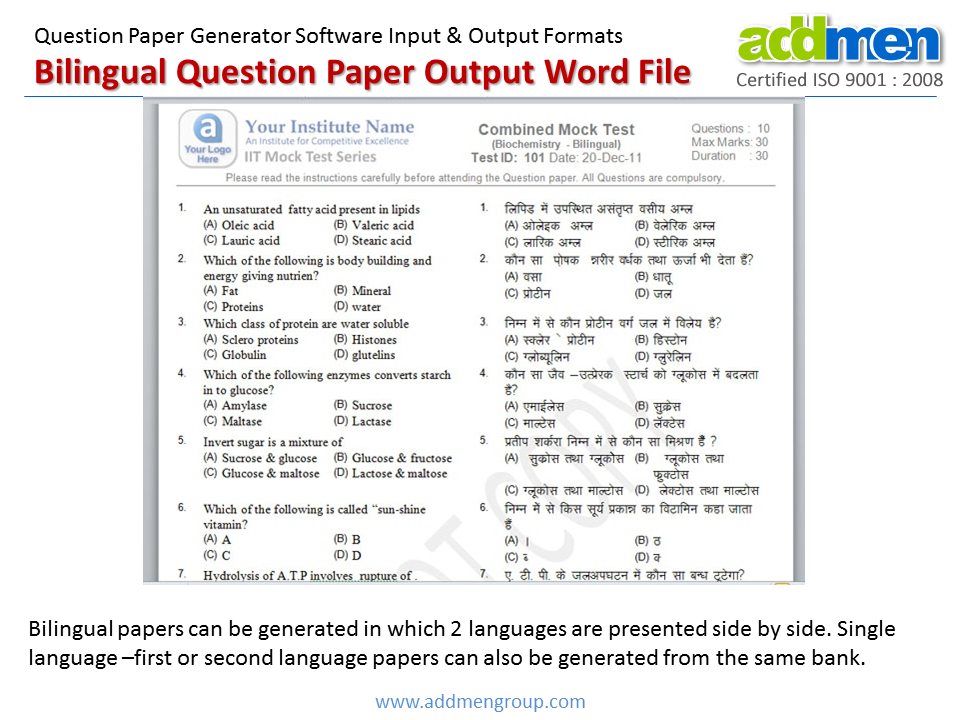
Yes, we can generate bilingual Question papers if we have created the second language bank also. The Test creation software does not translate the questions. Besides bilingual question paper, if we want we can generate only first language or only second language question papers also. We can get question paper in Gujarati, Marathi, Telugu or any other language, like Arabic etc.
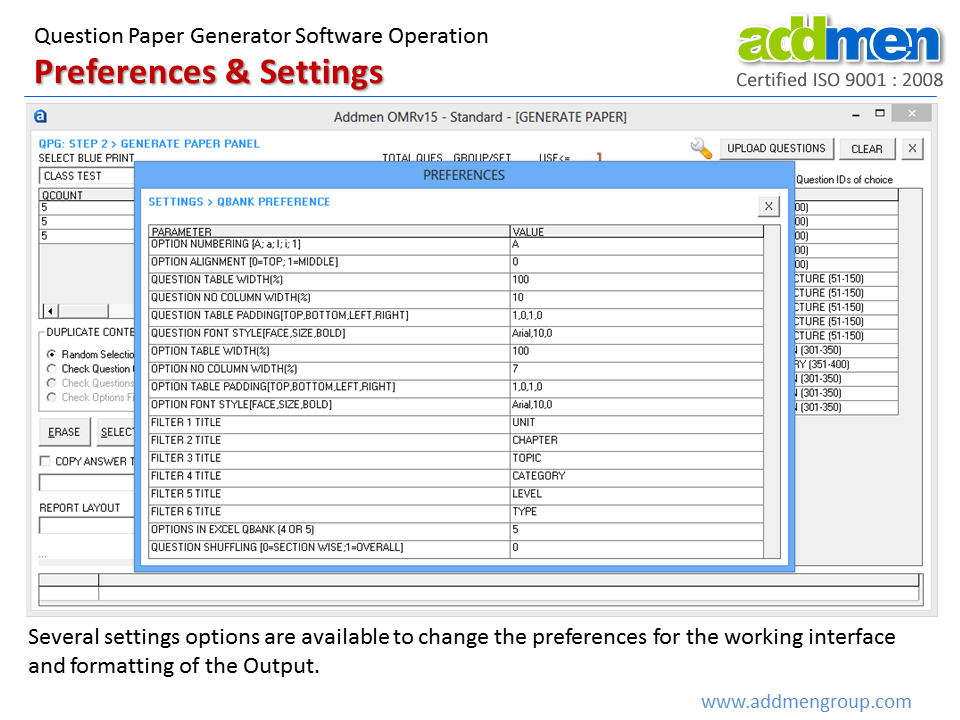
Yes, we can change the settings of the question generator software to get the desired way of numbering in our MCQ test paper output. like: A,B,C,D or 1,2,3,4 or a,b,c,d or i,ii,iii,iv etc.
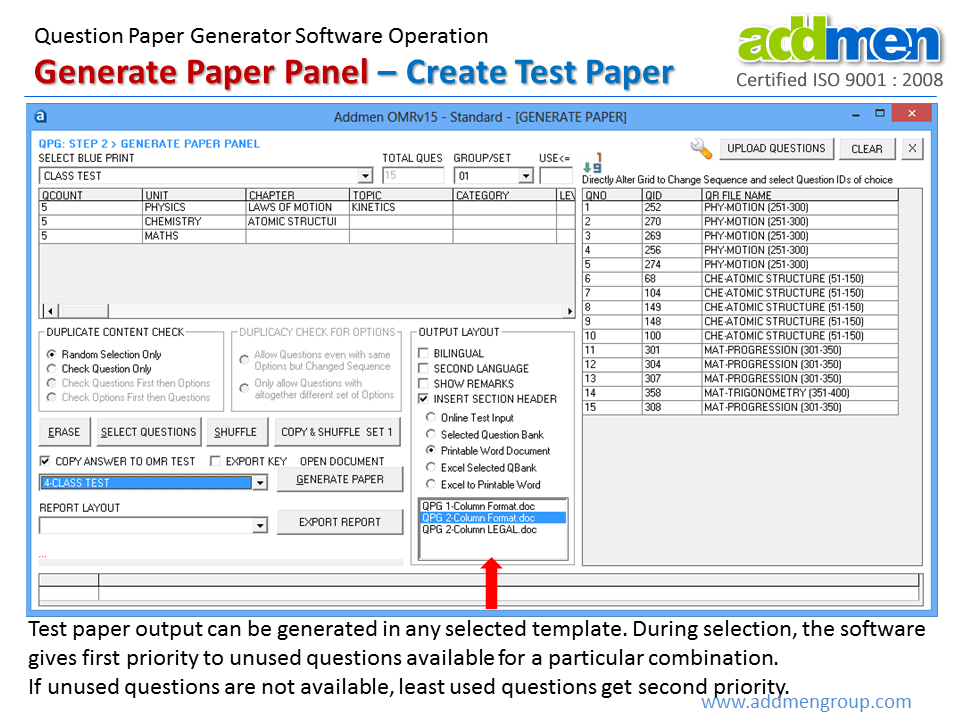
Yes, the user can create their own output template in word, which the Question papers software will use to create question papers. You can change the size and orientation, and also set the header-footer of the final output word file. You can also add your logo and desired watermark to it.
Yes, we can get the classification details of the questions along with the generated test question paper. We can also obtain the question shuffle order mapping of multiple sets of the same question paper created by the question shuffler.
Question Paper Generator is also known as Question Bank Software. Making assignment sheets, daily practice test, weekly test, Test series, Online Test etc. is a repetitive and time consuming process which involves both teacher and the computer operator. But these tasks can be very quickly and conveniently done within minutes using the Question Paper Software.
Institutions that conduct frequent tests like Coaching classes for competitive exams can use this Question Bank Software to create testpapers in minutes without much dependency on computer operators.
Introduction & Overview
FAQs on QPG Operation
Operation QPG Software
