
Addmen’s Question Paper Generator Software is a comprehensive solution for educational institutions, coaching centres, certification bodies, and exam administrators to automatically generate professional question papers. It simplifies exam preparation by integrating with a structured question bank and enabling customizable paper design, intelligent selection, multiple sets generation, and formatted output.
A Question Paper Generator is software that automates the creation of exam papers by fetching relevant questions from a categorized question bank based on predefined rules and requirements. It supports diverse question types such as multiple choice, theoretical, numerical, and fill-in-the-blank formats — making it suitable for both objective and descriptive assessments.
The software allows creation of exam papers containing a variety of question formats including:
Multiple choice questions (MCQ)
Fill in the blanks
True/False questions
Numerical and theoretical questions
Matching and common passage questions
This flexibility ensures that the generator can be tailored to most classroom and competitive exam patterns.
Questions are selected intelligently from your question bank based on filters such as subject, topic, difficulty level, and marks. The system ensures that questions are not repeated within the same paper, helping maintain test integrity.
Along with the final exam paper, the software automatically generates an answer key, saving educators time and reducing mistakes during evaluation.
The tool supports multiple unique versions of the same exam by automatically shuffling questions and, if needed, answer options. This feature is particularly helpful for secure assessments where cheating prevention is critical.
Define how your exam will be structured by setting up a blueprint that specifies topics, difficulty level ranges, number of questions, marks distribution, and other criteria. Custom filters ensure that selected questions match your academic goals.
Generate exam papers in bilingual or multiple language formats to support diverse student groups. This includes output in combinations such as English-Hindi, Marathi-English, and other language pairs.
Add your institution logo, watermarks, headers or footers to the final output. Export papers in standard formats such as Microsoft Word or PDF to support editing, printing, or digital use.
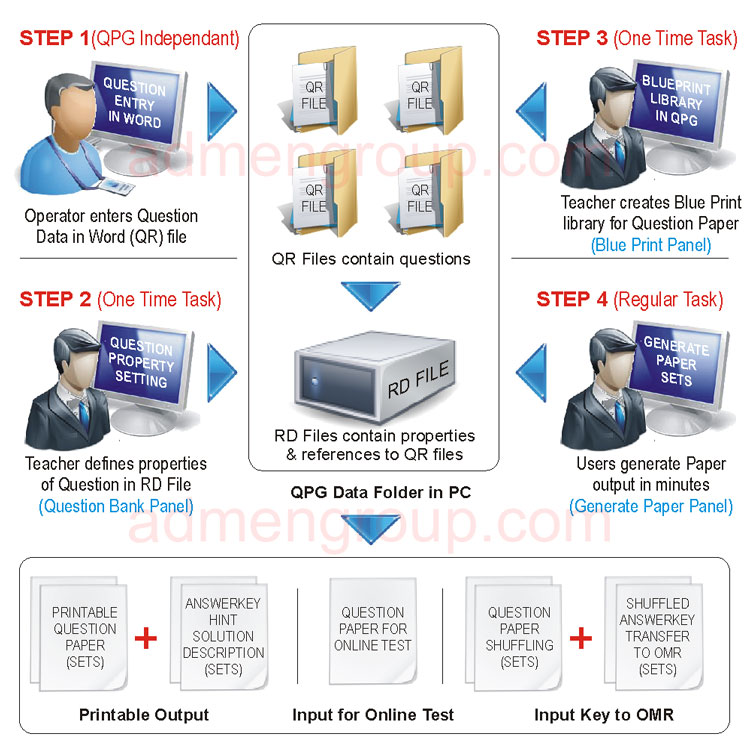
Decide the structure of your exam by specifying subject splits, number of questions, difficulty levels, and topic distribution. This acts as the blueprint for paper creation.
The software uses your existing question bank — organized and tagged by metadata — as the source pool for selection.
Using the blueprint, the system selects appropriate questions and can generate multiple unique versions by shuffling questions and optionally answer options.
Export final papers with answer keys in your preferred format, ready for printing or online distribution. You can include institutional branding such as logos and watermarks.
Time Savings: Generate professional exam papers in minutes instead of hours.
Consistency: Ensure all papers follow a uniform structure and blueprint.
Security: Reduce risk of cheating with multiple shuffled sets.
Scalability: Produce many sets for large student groups rapidly.
Professional Output: Branded and formatted papers enhance presentation quality.
This software is ideal for:
Schools, Colleges & Universities conducting regular term exams.
Coaching & Test Prep Centers creating mock tests and practice papers.
Certification Bodies & Government Boards requiring secure, audit-ready test creation.
Online & Distance Education Platforms generating large question sets and digital tests.
Addmen’s Question Paper Generator Software transforms the traditional exam preparation process by automating question selection, ensuring non-duplication, supporting diverse formats, and enabling multiple unique sets with customizable blueprints. It strengthens academic workflows, enhances exam security, and delivers ready-to-distribute papers quickly and efficiently.
Introduction & Overview
FAQs on QPG Operation
Operation QPG Software
