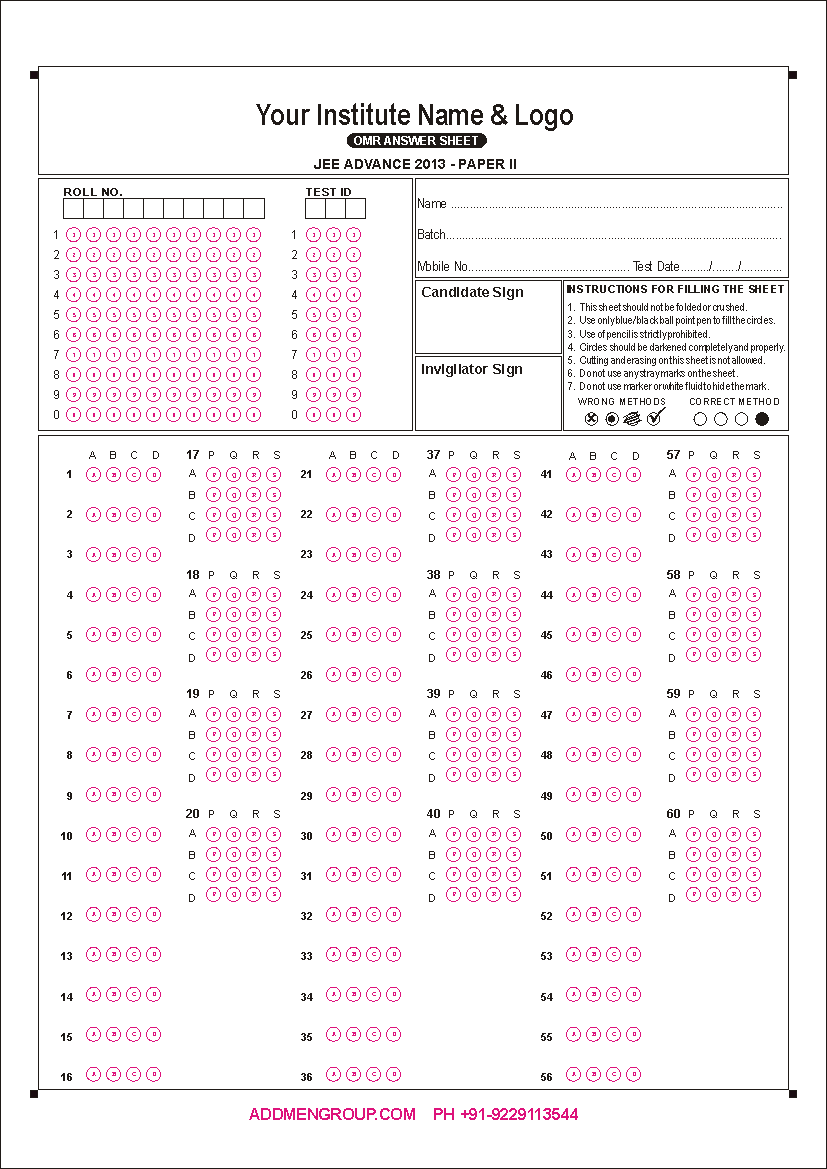
When exams, surveys or assessments include matching questions or multiple sub-questions per main question, a standard MCQ bubble sheet may not suffice. For such cases, Addmen provides a robust Matrix Block design: a structured grid of rows and columns where each row corresponds to a sub-question and each column corresponds to an answer option. This lets you build answer sheets that handle column-matching, passage-based questions, and multi-part responses — all readable by OMR software.
A Matrix Block uses a bubble-grid: multiple rows (questions or sub‑questions) down one axis, and multiple columns (options) across the other. For example: a 4-row × 4-column grid where each row has 4 possible answers.
Each row corresponds to a sub-question or item.
Each column represents one possible answer option for that sub-question.
The candidate selects one bubble per row (i.e., for each sub-question).
When collected together, the filled grid gives a structured response string (e.g. “P-R-S-Q”).
Matrix Blocks are ideal when:
You have matching-type questions (e.g. match items in Column A with Column B).
Surveys or tests contain passage-based sets or grouped questions — where multiple sub-questions belong to one main question.
You want a compact yet organized layout — multiple sub-questions under one question block reduces sheet length and simplifies design over having separate MCQ blocks per sub-question.
You need consistent scanning & automated data capture using OMR software. A properly designed matrix block integrates seamlessly with roll-number fields, test codes, and other OMR components, ensuring efficient data processing.
With Addmen’s OMR Sheet Designer (included in Addmen OMR software), you can:
Configure custom matrix grids: choose how many rows (sub-questions) and columns (options) you need per matrix block (e.g. 4×4, 5×5, or any required structure).
Place matrix blocks anywhere on the sheet — along with other block types (MCQ, integer, alphanumeric, barcode, etc.) — to build hybrid answer forms as needed.
Ensure bubble size, spacing, and alignment meet scanner requirements — preventing misreads or invalid scanning.
Export the design and print using standard printers (laser, inkjet, offset) — no need for special pre‑printed sheets.
After test completion, scan filled sheets (flatbed or ADF scanners suffice), and the software automatically reads the matrix responses along with other OMR data (roll numbers, set codes, etc.).
Matrix blocks give flexibility in scoring:
Per-subquestion scoring: Each row’s answer can be evaluated independently; correct rows score individually, wrong rows do not affect others.
All-or-nothing scoring: For certain assessments, full credit may be given only if all sub-answers are correct; otherwise, zero. This is configurable, depending on exam policy.
Because responses are captured as structured strings (e.g. “P-R-S-Q”), the output is easy to parse and process for automated marking or manual review.
Matrix-block OMR sheets are best suited for:
Entrance or competitive exams with matching type questions
Subjective tests with grouped questions/passages requiring multiple related answers per question set
Surveys, questionnaires, or feedback forms where multiple items need selection under one heading
Hybrid answer sheets combining MCQ, integer, matrix, roll-number fields, and more
Large-scale exams or tests needing space-efficient layout without compromising clarity or scan accuracy