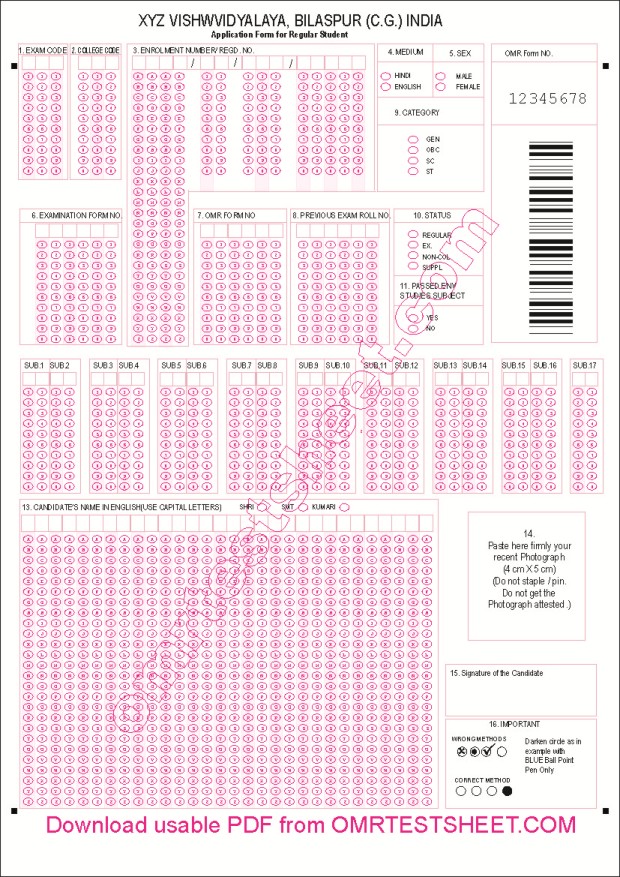
The Addmen OMR Application Form system offers institutions a robust, automated way to collect application, registration, admission, or questionnaire data using OMR-compatible forms. Designed to meet diverse needs — from school admissions and recruitment to feedback surveys and data collection — our OMR form design solution ensures fast, accurate, and error-free input processing.
An OMR application form is a data-capture sheet that replaces manual, handwritten forms. Instead of writing, applicants mark bubbles or checkboxes (for choices), or fill numeric/alphanumeric bubbles for textual entries — so that all data can be read by software automatically. With Addmen’s built-in OMR Form Designer, you can create custom application forms, admission forms, registration sheets, surveys, and more.
OMR application forms are ideal when you have large number of participants — whether students applying for exams/admissions, job applicants, course enrollees, or survey respondents. The automation saves time, reduces manual data entry, and ensures high accuracy.
When designing an OMR application form with Addmen, you can include a variety of fields depending on data requirements:
Candidate/Applicant Identification Blocks: Numeric or alphanumeric bubbles to capture roll numbers, application IDs, registration numbers, or unique identifiers.
Personal Details Section: Optional blocks for name, gender, date of birth, category, contact info, etc. using bubble-matrix or alphanumeric layouts.
Choice/Option Fields: Bubble- or checkbox-based fields for selecting options — e.g. course applied for, exam centre preference, yes/no questions, multiple-choice answers in surveys.
Barcode / ID / Serial-Number Blocks: For pre-printed or system-generated unique codes — useful for anonymization, audit trail, or secure processing.
Instruction & Guidance Area: Clear instructions on how to fill the form — mark bubbles correctly, avoid stray marks, follow pen/ pencil instructions — to ensure accurate data reading.
Because Addmen’s OMR Sheet Designer supports multiple block types — from simple MCQ-style bubbles to numeric, alphanumeric, barcode, and hybrid blocks — you have the flexibility to build a form exactly aligned with your data-collection needs.
Automated Data Capture: OMR reading software reads filled bubbles automatically — eliminating manual data entry, reducing errors and saving time.
Flexible & Customizable: You can design forms of any layout and size — from small registration slips to full-fledged multi-field application forms. The sheet designer offers drag-and-drop block placement, and supports numeric, alphanumeric, barcode, and hybrid formats.
Cost‑Effective: Forms can be printed on standard paper (A4 or legal) using regular laser or inkjet printers — no special hardware or expensive pre-printed forms required.
Scalable for Large Groups: Whether you are processing a few dozen applications or thousands, OMR forms scale seamlessly — suitable for large-scale admissions, recruitment drives, surveys, or registration processes.
Accuracy & Reliability: Because the form design is technically compliant (with correct index points, bubble matrices, barcode/ID fields, etc.), the OMR software reliably reads marked data, minimizing misreads or errors.
Open Addmen OMR Sheet Designer — either start with a blank template or duplicate an existing form layout.
Place required data blocks — bubble matrices for choices, numeric/alphanumeric blocks for IDs, barcode blocks if needed, and optional personal-info fields.
Add instructions, headers, and institutional branding — once data blocks are arranged, export the design to a graphics editor (e.g. CorelDraw or free alternatives) to add logos, titles, guidelines or exam-centre details.
Print the forms — using a standard printer (laser/inkjet/offset). Regular paper works fine; there’s no need for special pre-printed stock.
Distribute to candidates/applicants, have them mark bubbles or fill required fields, and collect completed forms.
Scan filled forms using any flatbed or ADF scanner — no special scanning hardware required.
Process with Addmen OMR Form Reader — the software reads data, extracts responses into digital formats (Excel or CSV), and presents compiled datasets for further action (selection, analysis, verification).