
This page presents detailed answers to frequently asked questions about question selection and shuffling in the Addmen Group Question Paper Generator (QPG) software. These explanations will help you understand how the system chooses questions from the bank, how it prevents repetition, how multiple sets are created, and how shuffling affects answer key generation.
Whether you are creating weekly tests, practice assignments, final exams, or competitive assessments, following the rules below ensures balanced, fair, and professional question papers.
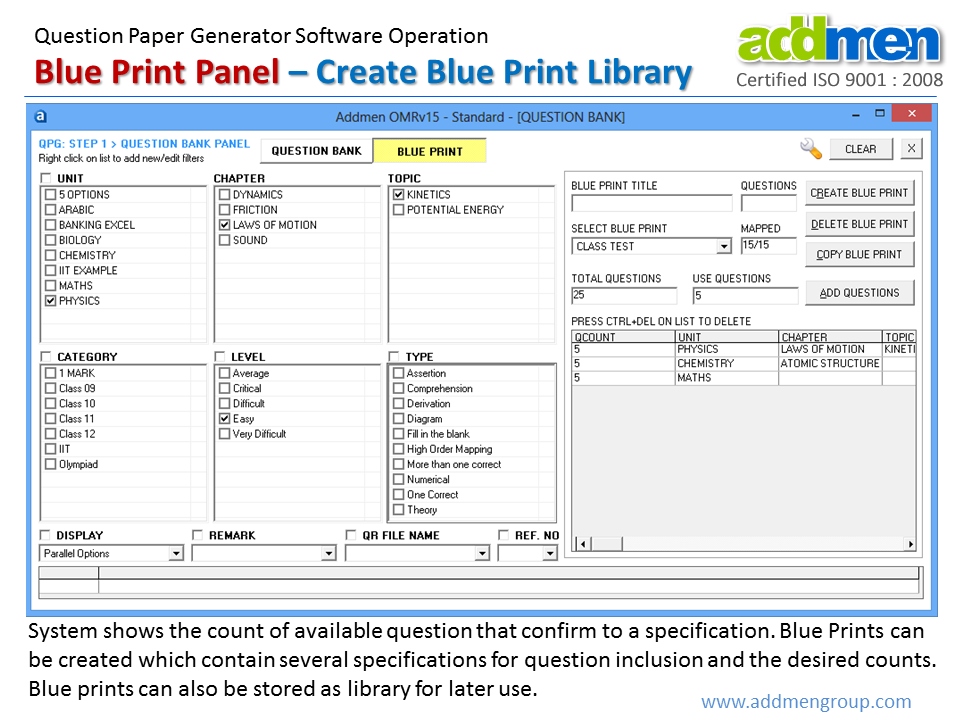
The software selects questions based on the properties and filters you define in the blueprint. Filters may include:
Subject
Unit or category
Topic
Difficulty level or marks
Question type
When generating a paper, the system searches the question bank for questions that match all specified filters and criteria, and then retrieves those questions for inclusion in the output. The selection algorithm checks available classification metadata and builds a list of questions that satisfy the blueprint requirements.
The software supports multiple filters to refine question selection, including:
Subject filter
Unit or category filter
Chapter and topic filter
Difficulty level filter
Marks level filter
Question type filter
You can also define user-defined filters, such as nested filters (for example, Unit followed by Chapter followed by Topic) or standalone filters like Category and Difficulty. These filters help tailor question selection to precise exam goals.
Yes. You may combine filters to narrow down the pool of eligible questions. For example, you can select questions from a specific subject, within a specific topic, of a certain difficulty, and with a specified mark value. Combining filters gives you greater control to ensure the generated question paper meets your instructional and assessment standards.
When randomization is enabled in the blueprint settings, the software selects questions in a non-sequential and non-predictable order. Randomization helps ensure that different generated papers do not appear in the same question sequence. This is particularly useful when generating multiple sets for the same exam, as it reduces the risk of answer copying between candidates.
Randomization can occur in two ways:
Both methods help create a varied test environment while still respecting blueprint rules.
Yes. The system includes logic to prioritize questions that have been used less frequently in prior papers. This minimizes repetition across multiple generated papers when the question bank has sufficient qualifying questions. If the pool of new questions is limited and cannot satisfy the blueprint criteria, the system may include previously used questions as necessary.
This function is especially valuable for institutions that generate frequent test papers for large batches of learners over time.
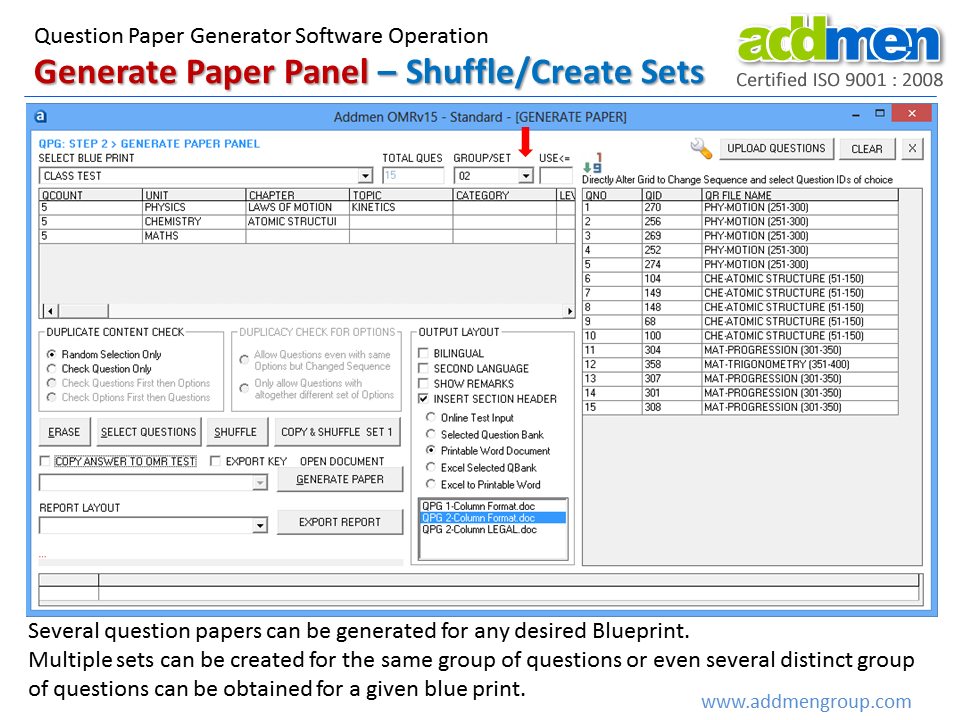
Randomization refers to the selection of questions from the bank, whereas shuffling refers to reordering the questions or options within an already selected set. Shuffling is typically applied after question selection and is used to produce multiple distinct sets from a single blueprint.
Shuffling can be applied at two levels:
Shuffling questions within sections so that the order of questions changes
Shuffling answer options so that the positions of option A, B, C, D, or other formats are changed
Shuffling helps prevent answer copying and improves exam security.
Define a blueprint with the required filters and criteria.
Select the number of sets you want to generate.
Enable the shuffling option for questions and, if needed, for answer options.
The result is multiple, distinct question papers that obey the same blueprint rules but differ in sequence and structure.
No. Shuffling preserves the section order and blueprint structure, meaning that questions stay within their intended sections and do not cross section boundaries. Only the order of questions within sections and the order of answer options change.
For example, if your blueprint splits the exam into Part A and Part B, shuffling will not move Part B questions into Part A or vice versa. Shuffling changes only the internal ordering of questions.
When multiple sets are produced, the software generates corresponding answer keys for each set. Because options may have been shuffled, the answer key records the exact option position after shuffling.
Answer keys may be output in separate files or combined with the question paper file depending on your settings. Each answer key clearly references the question number and option label as they appear in that set.
Yes. Although the system uses filters and randomization logic to automate selection and shuffling, you can manually include or exclude specific questions when defining the blueprint or editing the question set before final output. This gives you greater control when managing special cases, preferences, or exam standards.
Yes. When you define a blueprint with difficulty level filters, the system accounts for these settings and balances the selection accordingly. For example, if your blueprint specifies easy, medium, and hard questions in certain proportions, the selection engine will retrieve questions that satisfy these distributions.
This enables balanced test design with predictable difficulty distribution across the paper.
Yes. If your test design requires a fixed order of questions or preserves a particular sequencing, you may disable shuffling when generating the paper. When shuffling is disabled, the software will still select questions according to the blueprint filters, but it will retain the original order.
This feature is useful for classroom tests or when students must see questions in a specific progression.
Shuffling enhances exam security by creating distinct sets so that adjacent candidates receive different question and option sequences. This reduces the likelihood of copying and supports secure test administration, especially for larger groups, competitive exams, and high-stakes tests.
Yes. Once multiple sets are generated with shuffling applied, each set can be printed directly. Because the software retains proper formatting, sections, and numbering, the output is ready for printing without additional adjustments.
Ensure that your print settings are consistent and that margins and page sizes match your institutional guidelines.
To get the best results from question selection and shuffling:
Ensure your question bank is well classified with appropriate tags for subject, topic, difficulty, and marks.
Use blueprints with clear filters to guide balanced selection.
Enable shuffling when generating multiple sets for secure exams.
Limit repetition by including a large pool of qualifying questions.
Test one or two generated sets to verify the output before printing or distribution.
Using these best practices helps maintain quality, fairness, and reliability in your test generation workflow.
Introduction & Overview
FAQs on QPG Operation
Operation QPG Software
