
The Multiple Choice Question Paper Making Software from Addmen Group is part of the Question Paper Generator (QPG) suite designed to streamline the creation of MCQ exams and assessments. This software combines a structured question bank with a powerful paper generation engine to automate test preparation, reduce errors, and save time for educators, trainers, and examination administrators.
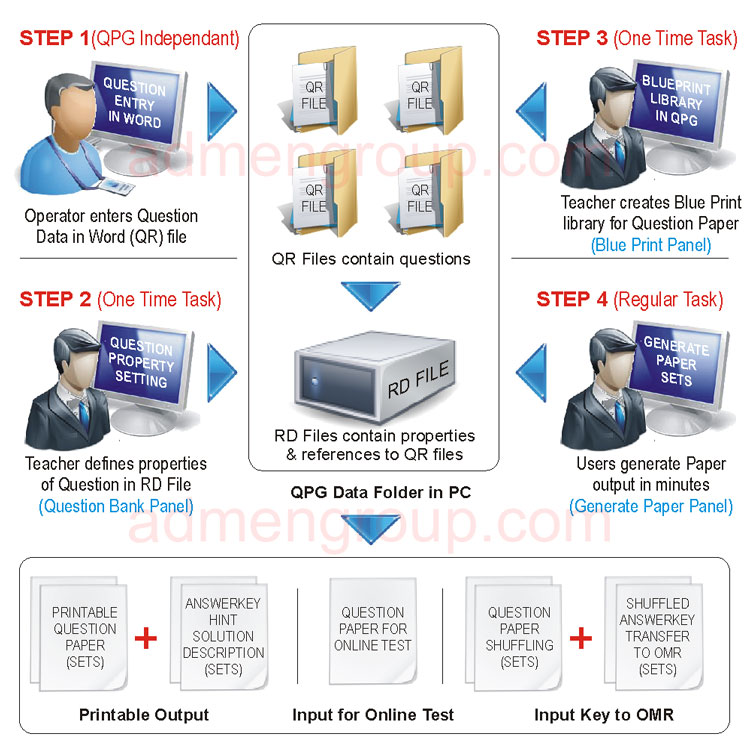
The process of generating MCQ and other question papers using Addmen’s software can be summarized in four easy, efficient steps:
Begin by creating your questions offline in a Word file. This can be done even before purchasing the software, allowing you to plan content in advance. Your Word files may include:
MCQs (Multiple Choice Questions)
True/False questions
Fill in the Blank
Numerical questions
Common passage questions
Theory/descriptive questions
Questions can be created in multiple languages and stored systematically until ready for import.
Once your Word files are ready, they are uploaded into the software and saved as QR files within the system. Each question is then assigned properties to help with retrieval and paper generation later:
Subject / Unit
Chapter
Topic
Category
Difficulty level
Question type (MCQ, numerical, theory, etc.)
This classification allows the software to accurately filter and select questions during the generation stage.
Using the blueprint interface, users define the structure and requirements of the exam paper. This includes:
For example, you may choose 20 questions with specific counts from various topics and difficulty levels such as easy, medium, and difficult.
With your blueprint defined and question bank organized, the software automatically selects appropriate questions and generates the MCQ paper. Key features of this stage include:
Randomized question selection based on blueprint filters
Generation of multiple paper sets to support exam security
Automatic question shuffling to prevent predictability
Fast conversion into the desired output format (Word, PDF, etc.)
The generator ensures no duplicate questions appear in the same paper, improving quality and integrity.
The structured process offers several practical advantages:
Time-saving automation from bank setup to final output
Reduced manual errors compared to hand-written papers
Consistent exam quality through repeatable blueprint structures
Multiple sets creation for secure examinations
Flexible output formats suitable for both print and digital use
This makes the software an ideal choice for schools, colleges, coaching institutes, certification bodies, and any organization that conducts frequent MCQ assessments.
Process Step |
Description |
Create Questions |
Prepare MCQs and other question types in Word files |
Classify into Question Bank |
Tag questions with metadata for later filtering |
Blueprint Definition |
Set exam requirements and structure |
Automated Paper Generation |
Generate and output test papers with shuffling and sets |
Addmen’s Multiple Choice Question Paper Making Software simplifies the entire exam paper creation process, from question bank building to final output generation. The software helps institutions generate professional MCQ exams with high consistency, accuracy, and minimal manual effort.
Introduction & Overview
FAQs on QPG Operation
Operation QPG Software
