
The The OMR Answer Sheet Checking Process is a fully automated workflow used to evaluate multiple-choice question (MCQ) examinations by reading scanned OMR sheets, comparing responses with an answer key, and generating instant results. Addmen OMR Software simplifies this entire process for schools, universities, coaching institutes, recruitment bodies, and large-scale examination organizations.
This system eliminates manual checking, reduces human error, and significantly speeds up result generation for thousands of candidates.
The OMR evaluation process is designed as a simple 4-step workflow:
Define the Test
Set or Import Answer Key
Scan & Read OMR Sheets
Generate Results & Reports
Each step is automated or semi-automated to ensure accuracy and scalability.
The first step in the OMR checking process is defining the structure of the exam.
Test Configuration Includes:
Test name and ID
Exam date
Number of subjects or sections
Number of questions per section
Marking scheme (positive/negative/decimal)
Question paper format
Special rules (e.g., attempt any 10 out of 15)
This step ensures the software understands how to interpret the answer sheet correctly.
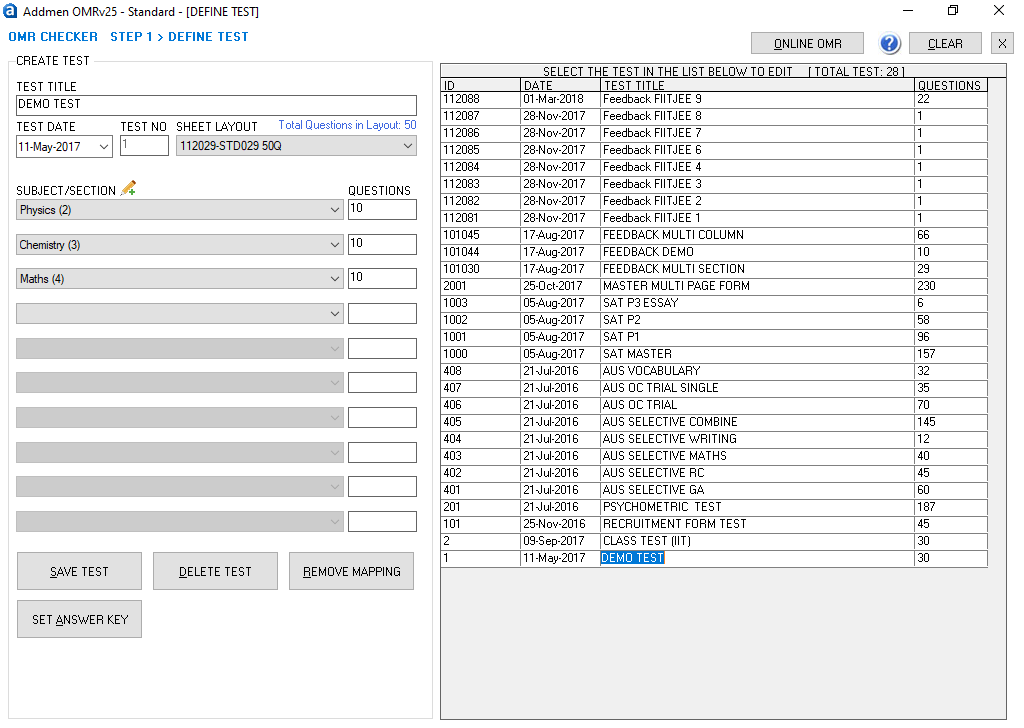
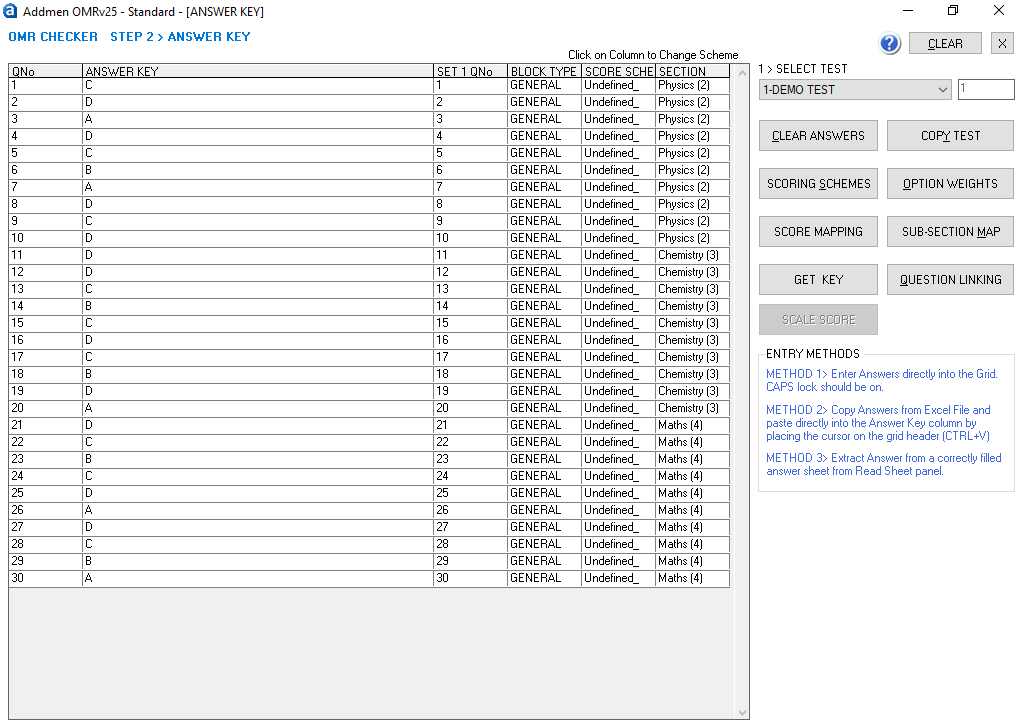
After defining the test, the correct answers are configured in the system.
Answer Key Setup Options:
Manual entry of answers
Import from Excel sheets
Copy-paste from documents
Extract from a correctly filled OMR sheet
Additional Configurations:
Negative marking rules
Question tagging
Subject-wise mapping
Multiple correct answers (if applicable)
This ensures accurate evaluation against predefined standards.
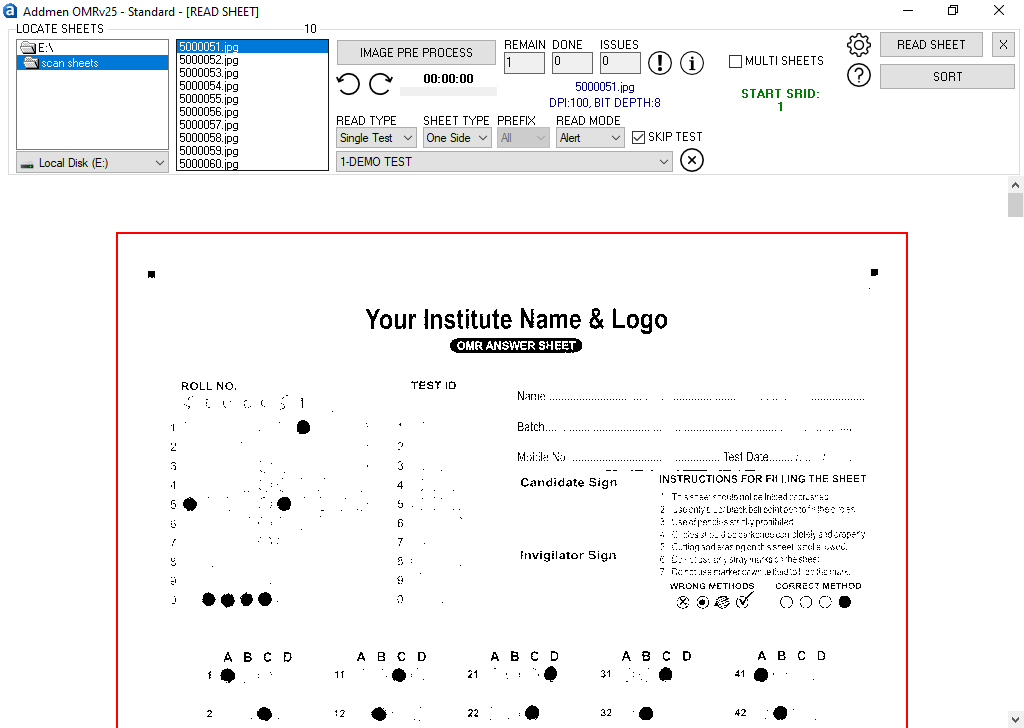
In this stage, physical OMR sheets are converted into digital data using scanners.
Supported Scanning Devices:
Flatbed scanners
ADF (Automatic Document Feeder) scanners
Multifunction printers
What Happens During Processing:
Sheets are scanned into image format
Software detects filled bubbles automatically
Skewed or rotated images are corrected
Duplicate or invalid entries are flagged
Multiple markings are identified
The system can process large batches continuously for bulk examinations.
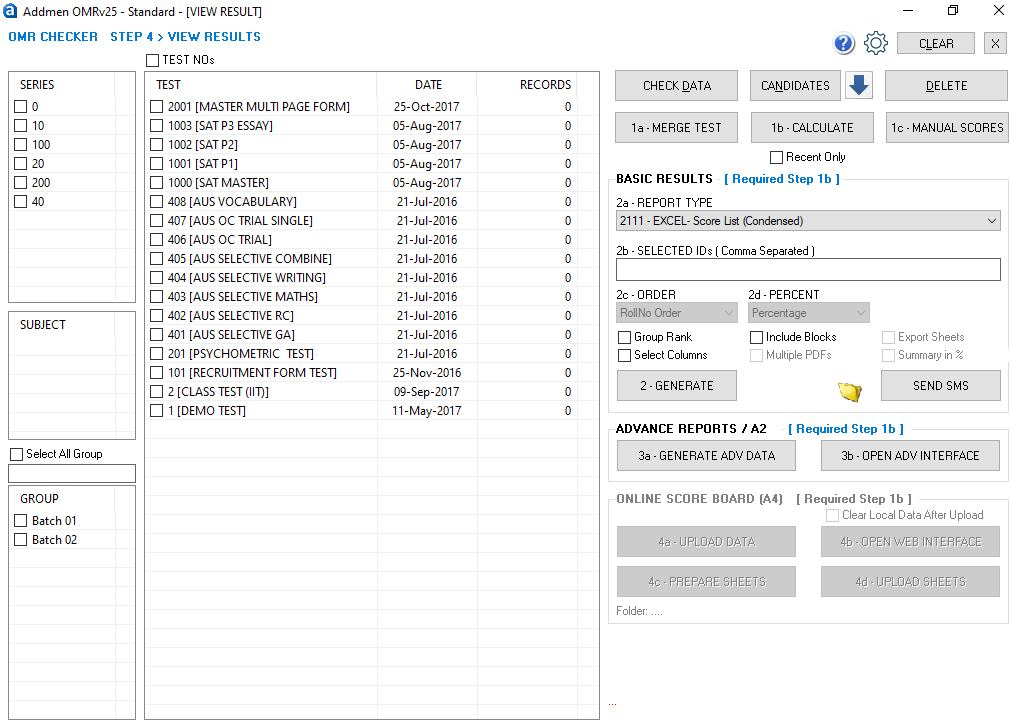
Once scanning is complete, the software evaluates all responses instantly.
Evaluation Includes:
Matching responses with answer key
Applying marking scheme
Calculating total scores
Applying negative marking rules
Identifying unanswered questions
Result Outputs:
Mark lists
Rank lists
Merit lists
Subject-wise performance reports
Question-wise analysis
Results can be generated within minutes depending on batch size.
1. Fully Automated Evaluation
The system automatically reads and evaluates answer sheets without manual intervention.
2. High-Speed Bulk Processing
Thousands of sheets can be processed quickly using batch scanning and parallel evaluation.
3. Auto Alignment & Skew Correction
The software automatically corrects:
Tilted scans
Rotated images
Misaligned sheets
This reduces the need for re-scanning.
4. Multiple Exam Set Support
Supports different question paper sets such as:
Set A
Set B
Set C
Set D
Each set is evaluated using its own answer key.
5. Flexible Marking Schemes
Supports multiple scoring models:
Positive marking
Negative marking
Decimal scoring
Weighted marks
Bonus marking
6. Error Detection & Validation
Automatically flags issues like:
Multiple marked answers
Blank roll numbers
Invalid entries
Duplicate IDs
Unclear responses
7. Advanced Reporting System
Generates detailed analytics:
Candidate performance reports
Subject-wise analysis
Question difficulty reports
Graphical dashboards
8. Export & Integration Options
Results can be exported to:
Excel
CSV
XML
Database systems
It can also integrate with institutional ERP systems.
9. No Need for Specialized OMR Machines
The process works with:
Standard scanners
Regular printers
A4 paper sheets
No expensive OMR hardware is required.
10. Re-Evaluation Without Rescanning
If the answer key changes:
No need to rescan sheets
Simply update key and recalculate results
Saves time in exam evaluation
Eliminates manual marking errors
Supports large-scale examinations
Reduces operational cost
Improves result accuracy
Enables instant result generation
Scalable for institutions of all sizes
Education Sector
School exams
College exams
University assessments
Competitive Exams
Entrance tests
Entrance coaching tests
Scholarship exams
Recruitment & HR
Aptitude tests
Screening exams
Job selection tests
Surveys & Research
Feedback forms
Market research
Opinion polls
Use dark black or blue pens
Ensure complete bubble filling
Avoid overwriting answers
Maintain consistent scanner settings
Avoid excessive sheet skewing
Run small test batches before full processing
Review flagged sheets manually
Addmen OMR Answer Sheet Checking System is trusted because it provides:
High accuracy evaluation
Fast processing speed
Flexible exam configurations
Advanced reporting tools
OCR, ICR, barcode integration
Scalable architecture for large institutions
Reliable technical support
What is the first step in OMR checking?
Defining the test structure including subjects, questions, and marking scheme.
Can answer keys be changed after scanning?
Yes, results can be recalculated without rescanning sheets.
Does it support multiple exam sets?
Yes, multiple sets like A, B, C, D are supported.
Can scanned sheets be tilted?
Yes, auto-alignment corrects skewed or rotated sheets.
Does it require special OMR machines?
No, it works with regular scanners.
The OMR Answer Sheet Checking Process is a fully automated workflow that transforms manual MCQ evaluation into a fast, accurate, and scalable system. With Addmen OMR Software, institutions can efficiently manage large examinations, generate instant results, and reduce operational workload while improving accuracy and reliability.
Read more: